We provide Marketing Operations coverage during maternity, paternity and parental leave. This guide is the plan we'd want any company to follow, whether or not they work with us. It covers what to scope, when to start, what to document, and what each platform needs while its owner is away.
Start by defining what your Marketing Ops person actually owns
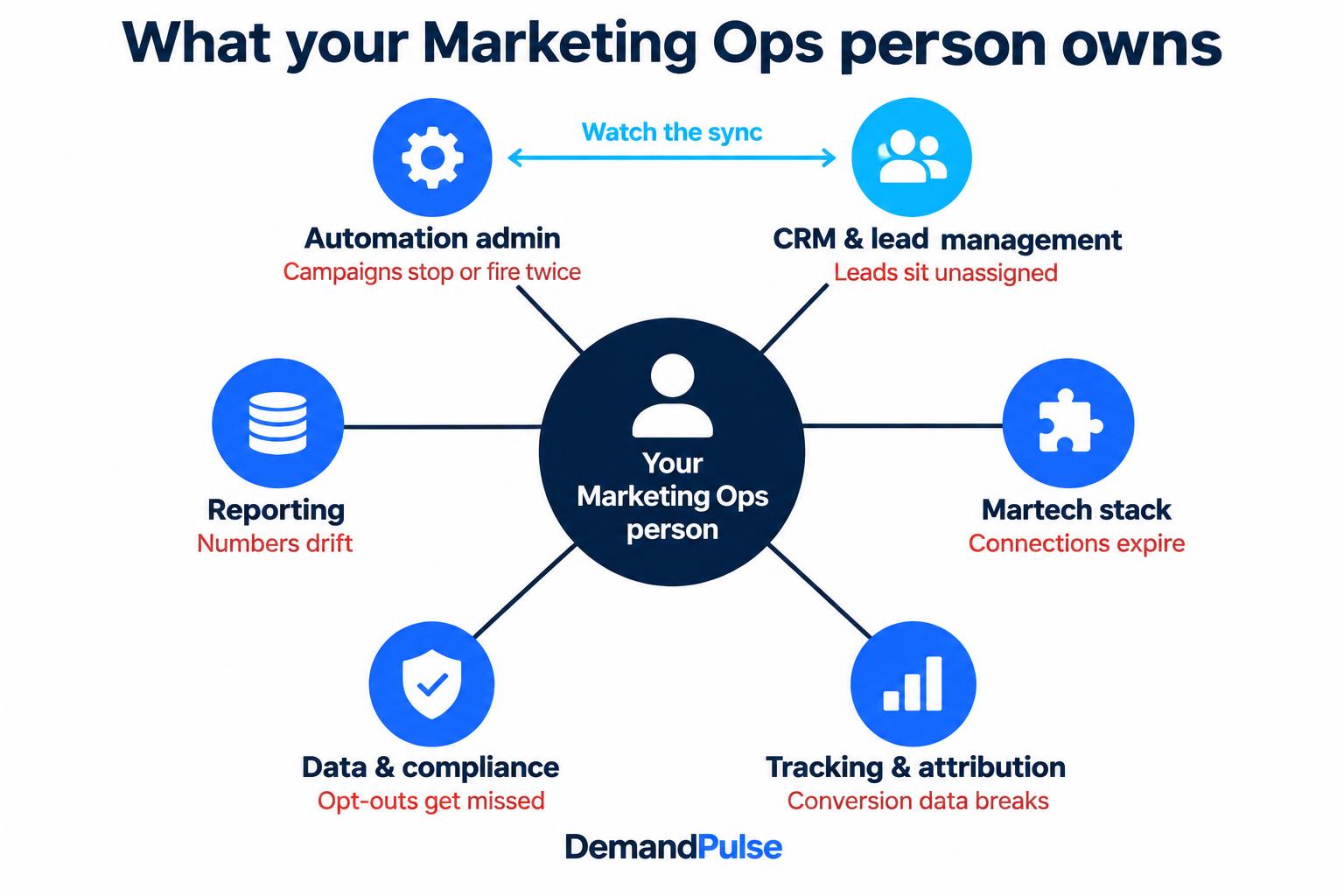
Marketing Ops is rarely one job. At a 40-person SaaS company, it might be one person who is CRM admin, automation builder and reporting analyst at once. At a larger company, it might be someone who only owns Marketo. Plan coverage for the person, not the job title.
| Role they may cover | What they own | What breaks first if nobody watches |
|---|---|---|
| Marketing automation admin | Marketo, HubSpot, Account Engagement or GoHighLevel programs, workflows, nurtures, scoring, email deliverability | Triggered campaigns silently stop or fire twice |
| CRM and lead management owner | Lifecycle stages, routing and assignment rules, the automation-to-CRM sync, sales handoff SLAs | New leads sit unassigned |
| Martech stack owner | Integrations with enrichment, webinar, chat and ABM tools, user access, vendor renewals | A tool's connection expires and nobody gets the alert |
| Tracking and attribution lead | UTMs, conversion tracking for paid search and paid social, offline conversion uploads, attribution reports | Ad platforms optimize toward broken conversion data |
| Data and compliance steward | Imports, deduplication, consent and subscription preferences, unsubscribe handling | Opted-out contacts get emailed |
| Reporting analyst | Pipeline and campaign dashboards leadership reads every week | Numbers drift and nobody can explain why |
Ask your Marketing Ops person to mark which rows apply to them, and roughly what share of their week each takes. That one exercise sizes your coverage better than any job description.
Why the risk is bigger than it looks
Marketing automation is built to run unattended, so for the first few weeks of a leave nothing looks wrong. The risk is in what's never been written down.
In Panopto's survey of 1,001 U.S. workers, run with YouGov, 42% of institutional knowledge was unique to the individual who held it. Respondents worked at organizations with at least 200 employees and had at least five years of work experience. The study is from 2018, but the pattern will be familiar to anyone who has inherited a Marketo instance. Source ↗
“However, employee expertise is fleeting when it's only shared through conversation.”
Eric Burns, co-founder and CEO of Panopto, 2018 press release. Source ↗
The stakes are real money. Connected tools still need someone accountable for their configuration, integration health and the reports leadership uses to make spending decisions.
According to the 2026 SHRM Employee Benefits Survey, 46% of surveyed employers offer paid parental leave, up seven percentage points from 2025. The survey covered 5,472 organizations; it isn't a measure of Marketing Ops leave length. Source ↗
Under the federal FMLA, eligible employees of covered employers can take up to 12 workweeks of unpaid, job-protected leave for qualifying reasons. Employer coverage and employee eligibility requirements apply, and company policies or state laws may provide different benefits. Plan around your employee's actual approved leave, not a general average. Source ↗
Choose your coverage model
There are four realistic options. Each fits a different situation. Timing and platform breadth depend on the people, access and scope you agree, not just the label on the engagement.
| Model | Best fit | Time to start | Platform breadth | Outcome owner | Watch for |
|---|---|---|---|---|---|
| Internal team | Light, stable workload | Depends on capacity and access | Existing team expertise | Named internal owner | Split accountability |
| Fixed-term hire | Dedicated temporary role | Allow for recruiting and ramp-up | Depends on the hire | Hire with clear remit | Recruiting and ramp-up |
| Freelancer | Defined specialist work | Depends on availability and access | Agreed specialist platforms | Agreed in the scope | Gaps between platforms |
| Marketing Ops partner | Connected-system continuity | Agree onboarding and overlap | Agreed connected stack | Partner within agreed scope | Scope and decision rights |
Whatever you choose, write down three things: who owns the function, what they're accountable for, and what they're allowed to change.
A 12-week plan for Marketing Ops leave coverage
This is the timeline we recommend. Compress it if you have less notice; the order still holds.
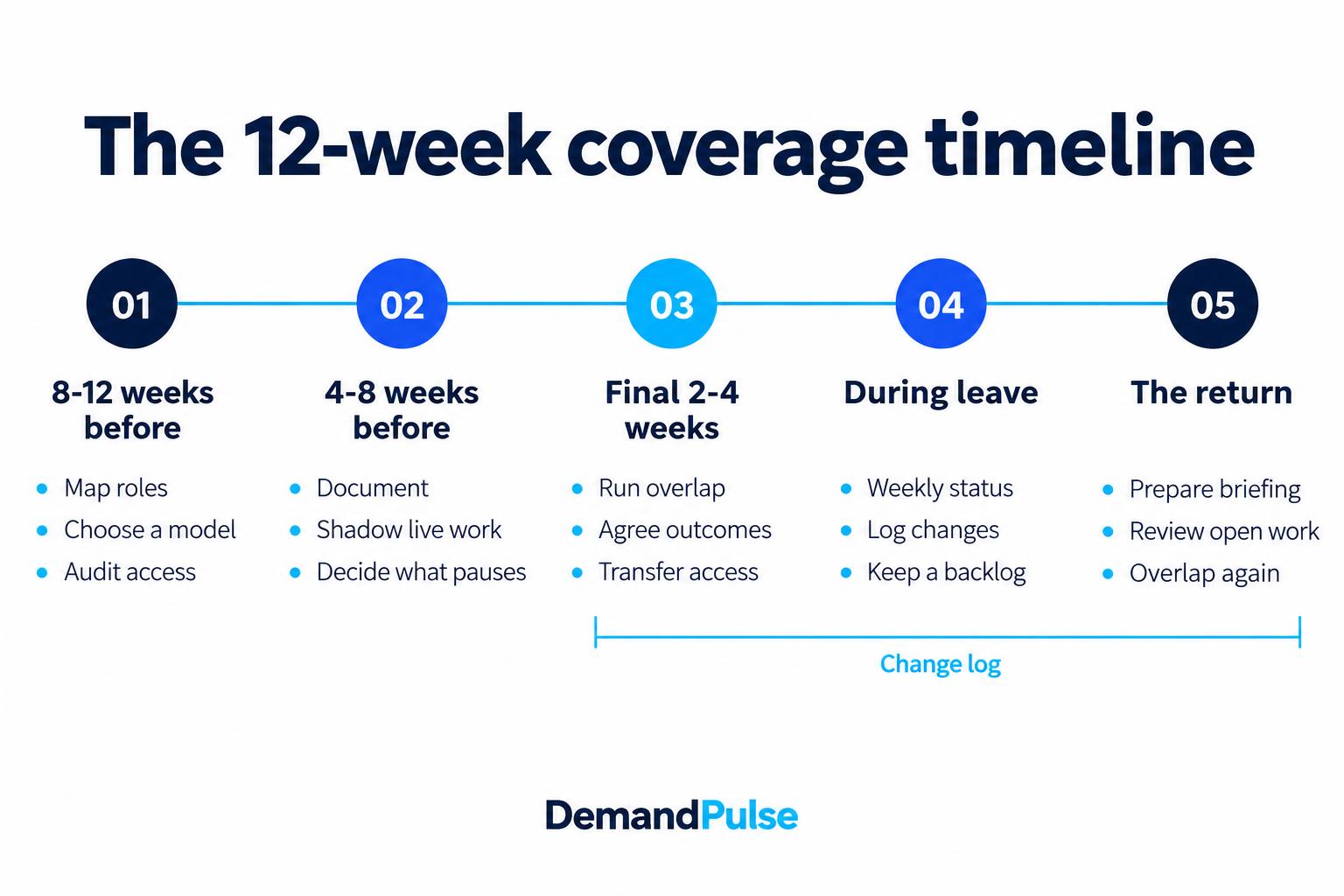
8-12 weeks before leave
- Do the role mapping above and choose a coverage model.
- List every recurring obligation: weekly reports, monthly board numbers, quarterly webinars, list uploads, renewals.
- Audit access: who has admin rights in each platform, and whose login each integration runs under.
4-8 weeks before leave
- Run a documentation sprint (see the next section).
- Bring your coverage owner in with read-only access to shadow live work.
- Decide what pauses. Not every campaign needs to launch during a leave, and saying so early takes pressure off everyone.
The final 2-4 weeks: overlap
- Run the recurring work together, with the coverage owner driving and your employee checking.
- Agree a written outcome list. For example: leads routed within the agreed window, sync errors cleared weekly, reports delivered on time.
- Agree a change policy: what can change freely, what needs sign-off, and what stays frozen.
- Transfer admin rights to named user accounts, and tell Sales, RevOps and leadership who to contact.
During the leave
- Weekly status note, monthly review against the outcome list.
- Every change logged with a date and a reason.
- Improvement ideas go into a backlog, not into production. Your employee should come back to the systems they left, not someone else's redesign.
The return
- Two weeks before the return date, prepare a return briefing: the change log, open work, and a prioritized backlog.
- Plan a short overlap after they're back, so the handback isn't a single meeting on their first morning.
What to document before the handover
Generic “document your processes” advice misses the things that actually break. Make sure your handover covers:
- Integrations running under a personal login. If a Salesforce sync, webinar connector or enrichment tool authenticates as your employee, it can fail the day their account is suspended or their password expires. Move these to a dedicated integration user before the leave, following your security policies.
- Multi-factor authentication tied to a personal phone. If admin access depends on codes sent to their phone, nobody can log in while they're away. Add backup admins with their own approved authentication methods.
- Routing and assignment logic. Not just the rules, but why they exist and which edge cases they handle.
- The scoring model. Thresholds, what each point value means, and when it was last reviewed.
- A field dictionary. Every custom field that drives a workflow, report or sync.
- The recurring work calendar. Owners and deadlines for each recurring obligation.
- Report definitions. What MQL, SQL and pipeline sourced mean in your dashboards.
- Vendor renewals and billing contacts. Renewals and billing responsibilities that fall inside the leave window.
Keep documentation inside your own systems, such as your wiki, your CRM, or a shared drive, never only in a provider's files. That's the same principle behind our documentation and training work.
Platform by platform: what needs an owner
Most stacks pair a marketing automation platform with a CRM, and the most expensive failures happen in the sync between them. These are the specific things we check first on each platform.
Adobe Marketo Engage
Trigger campaigns that depend on fields Sales Ops might change. Salesforce sync errors that block records from updating. Program member statuses that feed attribution. Communication limits that can suppress non-operational sends. Score decay campaigns that stop running.
HubSpot
Workflow enrollment and re-enrollment criteria. Lifecycle stage rules: default automatic updates move stages forward, not backward. Lead rotation when a rep leaves. Salesforce connector sync health and field mapping rules. Marketing contact status, which affects your HubSpot bill.
Salesforce
Lead assignment and validation rules, where a new rule from Sales Ops can stop marketing records from syncing. Campaign member statuses. Lead conversion field mapping. Duplicate rules. Campaign Influence settings if you report on it.
Account Engagement (Pardot)
Automation rules and completion actions. Engagement Studio programs. Scoring and grading. The Salesforce connector and its sync error queue. Business Unit settings if you run more than one.
GoHighLevel
Workflow triggers, pipelines and opportunity stages, forms and funnels, and, for teams sending SMS to U.S. recipients from local 10-digit numbers, A2P 10DLC brand and campaign registration status.
If your stack is mid-migration, finish or pause the migration before the leave starts. A half-finished technology migration without its owner is the hardest thing to cover. For ongoing platform support outside a leave, see our marketing automation operations and CRM administration services.
Don't forget tracking, attribution and compliance
These are the areas most likely to be left out of a handover, because the person who owns them often doesn't think of them as campaign work.
Conversion tracking for paid search and paid social
If your Marketing Ops person maintains Google Ads conversion actions, offline conversion imports from your CRM, the LinkedIn Insight Tag, or Meta's Conversions API, a broken feed means your ad platforms keep optimizing toward bad data. Your paid team may see costs rise without knowing why. Assign someone to check conversion volumes weekly against CRM numbers.
UTM and attribution governance
UTM naming conventions drift fast without an owner. So do the campaign structures that power attribution in HubSpot's attribution reports, Salesforce Campaign Influence, or Marketo Measure. Lock the conventions and keep one person accountable for them.
Consent and compliance
Check that opt-outs keep syncing between your marketing automation platform and CRM. Make sure imported lists carry consent status, and that unsubscribe links work on every send. Regulations like GDPR, CAN-SPAM and CASL, and Gmail and Yahoo's bulk-sender rules, don't pause for a leave. Neither do the deliverability problems that follow a compliance mistake. We help maintain the operational controls; we aren't your legal counsel.
What this looks like in practice
These illustrative planning scenarios show how to apply the guide. They aren't client testimonials or promised results.
“Our Marketing Ops Manager starts maternity leave in six weeks, and we run Marketo and Salesforce.”
The overlap goes to the sync: which Salesforce fields Marketo writes to, which validation rules can block it, and which trigger campaigns depend on Sales Ops fields. The coverage owner takes admin ownership on day one of the leave and reports sync health weekly.
“Our Ops lead is already out, and things are breaking.”
No overlap is possible, so start with triage: unassigned leads, sync errors, and campaigns due this week. Then build the documentation retroactively, from the systems themselves.
“Our paid team says conversions dropped, and nobody knows why.”
Check the offline conversion import and form tracking first. A renamed form field or an expired integration token can be a culprit. Assign someone who understands the feed to investigate before changing campaign budgets.
“We're a small team, and our only ops person is taking paternity leave.”
Spreading the work across marketers who don't own the systems can leave launches and troubleshooting without an owner. Scope coverage to the two or three roles from the table above that actually carry risk.
A leave-coverage engagement
As described on our service page, a B2B SaaS company with 25-50 employees needed coverage when its CMO, who personally carried marketing operations, took three months of maternity leave. The platform was Adobe Marketo, and no one else on the team held admin access or owned the lifecycle logic.
Nurture programs, email sends, lifecycle and routing, and the reports leadership reviewed each week kept running. Nurtures and reporting ran uninterrupted for the full three months. Lifecycle and issues were fixed and logged, and the return included a change log, open backlog and briefing.
Who owns the work
Our Marketing Ops team works across Marketo, HubSpot, Salesforce, Account Engagement and GoHighLevel. Before coverage starts, agree a named owner, the platform permissions they'll need, their escalation path and what they're authorized to change. Platform experience matters; clear responsibility matters just as much.
Frequently asked questions
How far in advance should we plan Marketing Ops coverage for maternity leave?
Start 8-12 weeks before the leave if you can. That leaves time to choose a model, document the systems, and run two to four weeks of overlap. With less notice, prioritize access, integrations and the recurring work calendar.
What should a Marketing Ops handover document include?
Access and admin users, integrations and the logins they run under, routing and scoring logic, a field dictionary, the recurring work calendar, report definitions, and vendor renewals due during the leave.
Should we pause campaigns during parental leave?
Pause what nobody can own, not everything. Always-on programs, routing and reporting should keep running. New launches can be prioritized against your coverage capacity.
Can we split Marketing Ops work across the existing team instead?
For light, stable workloads, yes. For multi-platform stacks, it usually means nobody owns troubleshooting, and problems surface weeks later.
Should we migrate or rebuild systems before the leave?
Only if the work will be finished and stable before the leave starts. Otherwise, pause it and log improvements in a backlog for when your employee returns.
What if the leave starts earlier than planned?
Have the access audit and integration fixes done first, since those are the hardest to sort out remotely. Everything else can be documented from the systems themselves.
How do we avoid contacting the person while they're on leave?
Agree in advance on what, if anything, warrants contact, and route every question to the coverage owner. Good documentation is what makes that possible.
Plan your coverage before the first workflow breaks
If your Marketing Ops person is going on maternity, paternity or parental leave, we can help you plan and cover it, from the first inventory to the handback. See how our Marketing Ops leave coverage works, or tell us the leave date and your stack and we'll map what needs to keep running.
Start the ConversationRelated reading
Subscribe for Insights That Drive Growth
Practical tips to help you grow your business and build a great team, sent to your inbox.