Programs vs. Smart Campaigns in Marketo: What's the Difference?

When you're first diving into Marketo, it's all too easy to feel confused by the terminology. The words "campaigns," "programs," and "channels" can seem interchangeable until you realize they each have a distinct place in your workflow. Let me help clarify this in a way that just clicks.
What Is a Program?
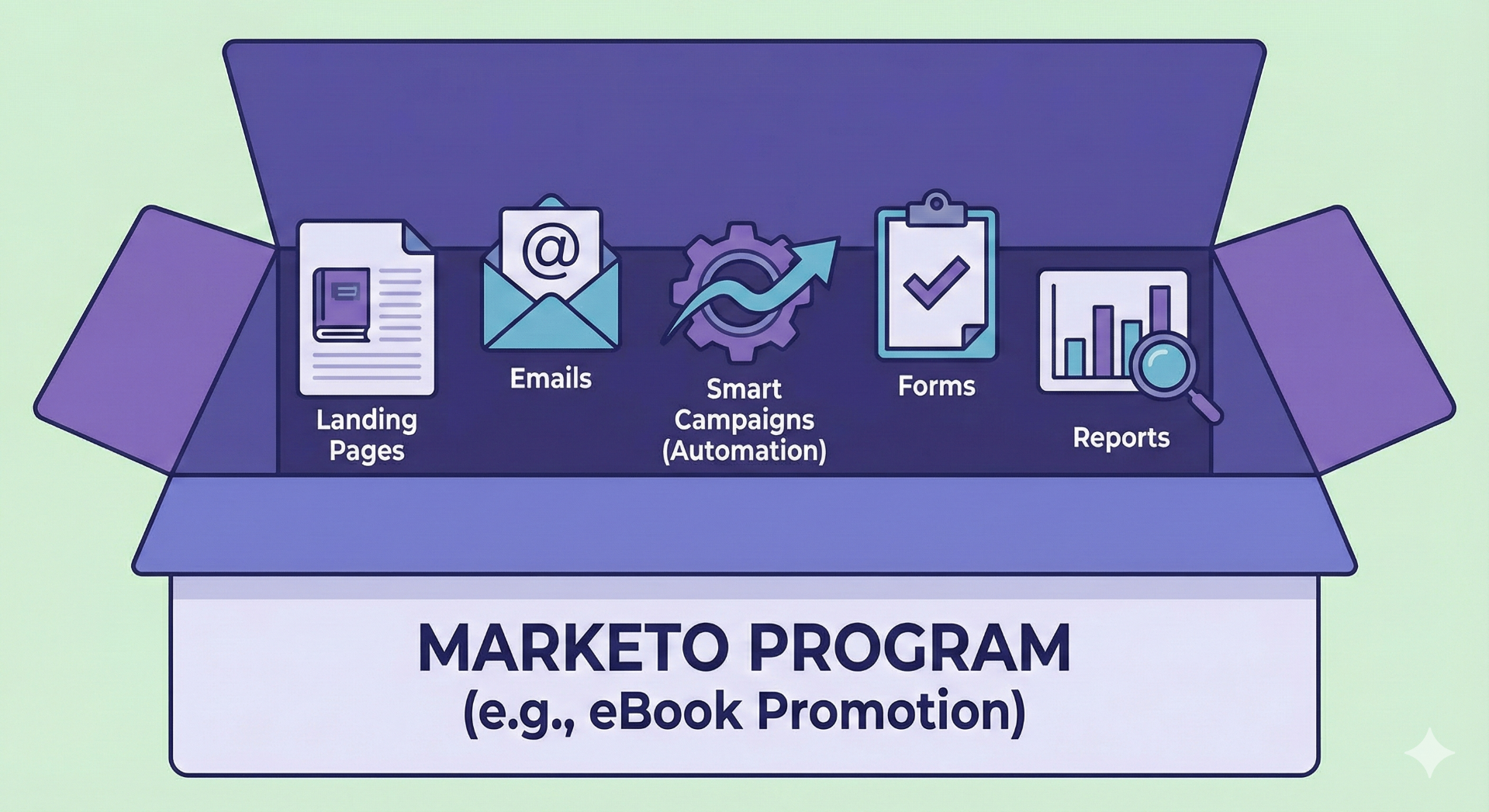
Think of a Program as the container or "campaign package" in Marketo. It holds everything you need for a marketing initiative—assets like emails, landing pages, forms, smart lists, reports, and more.
Programs enable better organization, reporting, and cloning of your marketing activities. Examples of program types include Email Programs, Engagement Programs (for lead nurturing), Event Programs (for webinars or trade shows), and Default Programs (for miscellaneous marketing efforts).
For example, if you're launching an eBook promotion, one Program might include:
- • Landing pages (offer page and confirmation page)
- • Emails (confirmation, reminders)
- • Smart Campaigns for sending and follow-ups
- • Performance reports
As our Marketing Ops Expert, Julia Thurnston, puts it: "A program is the skeleton, while a smart campaign is the brain."
What Is a Smart Campaign?
Campaigns in Marketo refer to Smart Campaigns, which are the automation engines within a program. Inside that Program are Smart Campaigns, which define the "who, what, and when" of the action:
Who: Set who qualifies or triggers (e.g., someone fills a form)
What: Define the actions (send email, change data, etc.)
When: Schedule when it runs or triggers (immediately, daily batch, etc.)
Example: In the eBook Program (which would be a Default Program):
- • Smart Campaign "Send eBook link on form submit"
- • Smart Campaign "3-day follow-up email → then 7-day follow-up"
- • Smart Campaign "Track purchase and mark Program Success"
Channels – What They Are and Why They Matter
What Is a Channel?
A Channel in Marketo is the category or "bucket" for your Program. It describes the delivery mechanism or marketing tactic (e.g., Email Send, Webinar, Event, Nurture).
Channels are not separate entities but are assigned to programs to specify what kind of marketing activity the program represents. Channels shape how Programs are reported, help track funnel stages, and define Success, allowing Marketo analytics to track how leads move through and succeed within programs.
When creating a Program, you assign a Channel, which determines:
- • The default member statuses (like Invited→Registered→Attended)
- • Which status equals Program Success (e.g., Attended is success for events)
Example: Webinar vs. Email
- • Webinar Program (Channel = Webinar): statuses → Invited → Registered → Attended → No-Show; Success = Attended
- • Email Blast Program (Channel = Email Send): statuses → Sent → Opened → Clicked; Success = Clicked
Channels help maintain consistently comparable reporting, like cost per lead (budget ÷ success count).
How They All Work Together – A Simple Flow Example
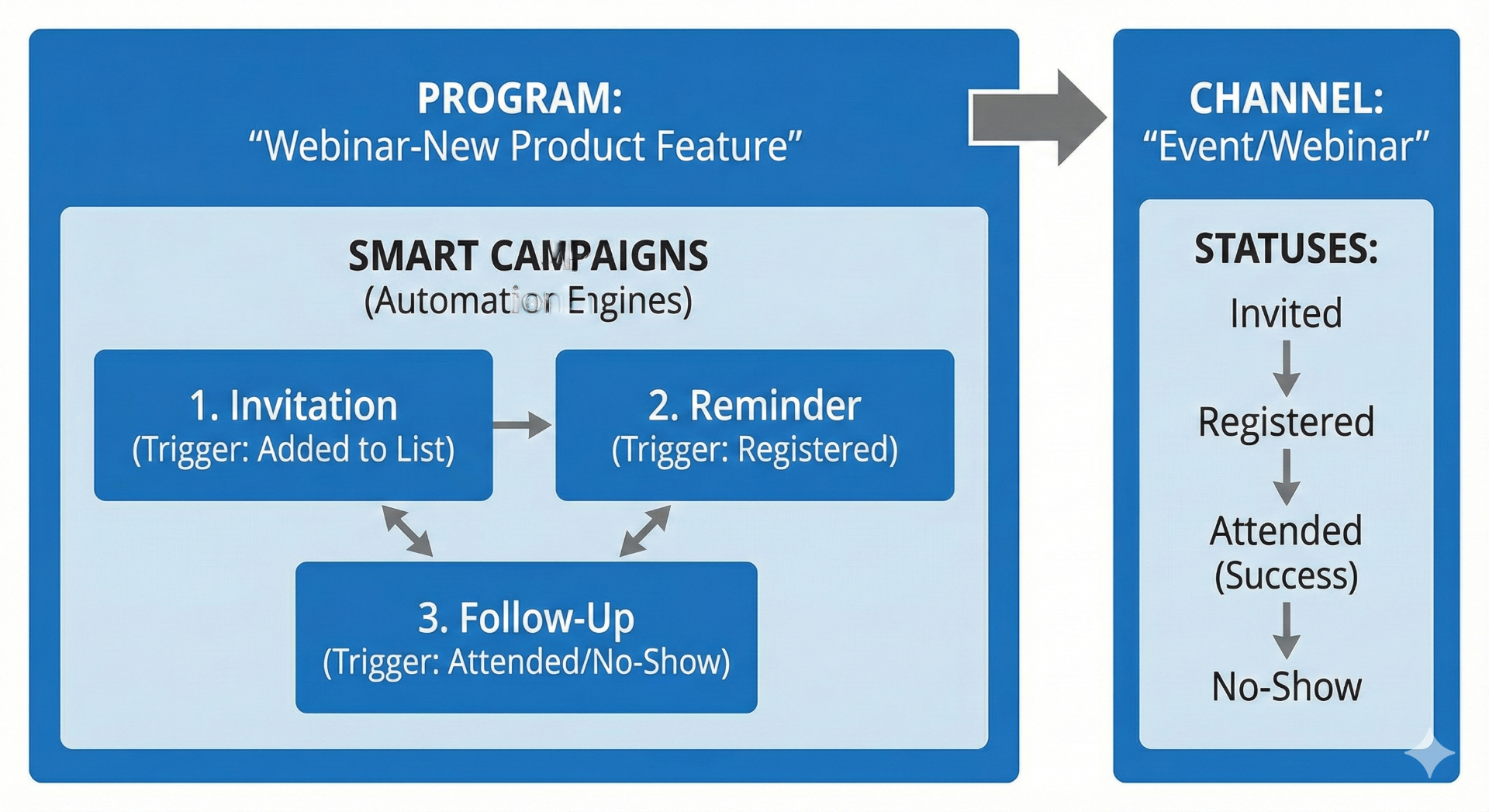
Imagine your marketing team wants to host a webinar introducing a new product feature. Here's how you'd set it up in Marketo:
1. Program – Your Organized Container
- • You create a Program named something like "Webinar-YYYY-MM-DD-New Product Feature".
- • Choose the Program type: Event Program, which is tailored for time-bound events like webinars, and supports tracking registrations and attendance.
- • This Program will include all related assets: landing pages, invitation and confirmation emails, Smart Campaigns, and reports.
2. Channel – How You Track It
- • Assign the Program to an Event (or "Webinar") Channel.
- • Channels define progression statuses such as: Invited → Registered → Attended → No-Show, and determine which status counts as success (e.g. Attended).
- • This makes reporting consistent: you can easily measure how many invitees actually attended, cost per attendee, etc.
3. Smart Campaigns – Driving the Actions
Inside the Program, create Smart Campaigns for each part of the workflow:
- • Invitation: When contacts are added to the "Invited" list, trigger an invite email.
- • Reminder: Send reminders (e.g. 1 day before and 1 hour before) only to those who registered.
- • Follow-Up: After the webinar, send "thank-you" emails with recordings to those who attended, and "sorry you missed us" emails to registrants who didn't show.
- • Monitor Attendance: Track attendees and mark Program Success accordingly.
These Smart Campaigns handle the "who, what, and when", making the webinar flow happen automatically.
Best Practices
- Use Programs as modular containers: Each marketing effort (email blast, event, nurture) is its own Program for clarity.
- Don't overdo Channels: Keep them high-level, only create new ones when a new delivery tactic needs its own tracking. Too many leads to confusion and bloated reporting.
- Leverage statuses for automation: For example, use "Registered" to trigger reminders; "No-Show" to send replay link, etc.
- Use Tags alongside Channels: These add another layer (ownership, region, product line) for more granular filtering in reports.
Need Help Optimizing Your Marketo Instance?
Our marketing operations experts can help you structure programs, campaigns, and channels for maximum efficiency.
Related Resources
Why You Should Switch to Global Forms in Marketo
Improve efficiency with consolidated global forms
Marketo vs. HubSpot for Scale-Stage SaaS
Compare the two marketing automation giants
Marketing Automation Services
Learn about our Marketo and marketing ops expertise
Subscribe for Insights That Drive Growth
Practical tips to help you grow your business and build a great team, sent to your inbox.