Is Your AI Support Actually Working? A CX Leader's Guide to Reading the Numbers Honestly

Your AI dashboard is probably telling you a cleaner story than the one your customers are living with. Here's how to read it honestly.
Let me guess how your last review went. The AI resolution rate landed on a slide, it was a big, healthy-looking number, everyone nodded, and the meeting rolled on. And somewhere in the back of your head there was this small, nagging thought you didn't quite say out loud: okay, but is that number actually telling me my customers are fine?
If that's you, you're not being paranoid. You're being a good operator. Because here's the part nobody really warns you about with AI powered customer service: the dashboard and the customer are often having two completely different days.
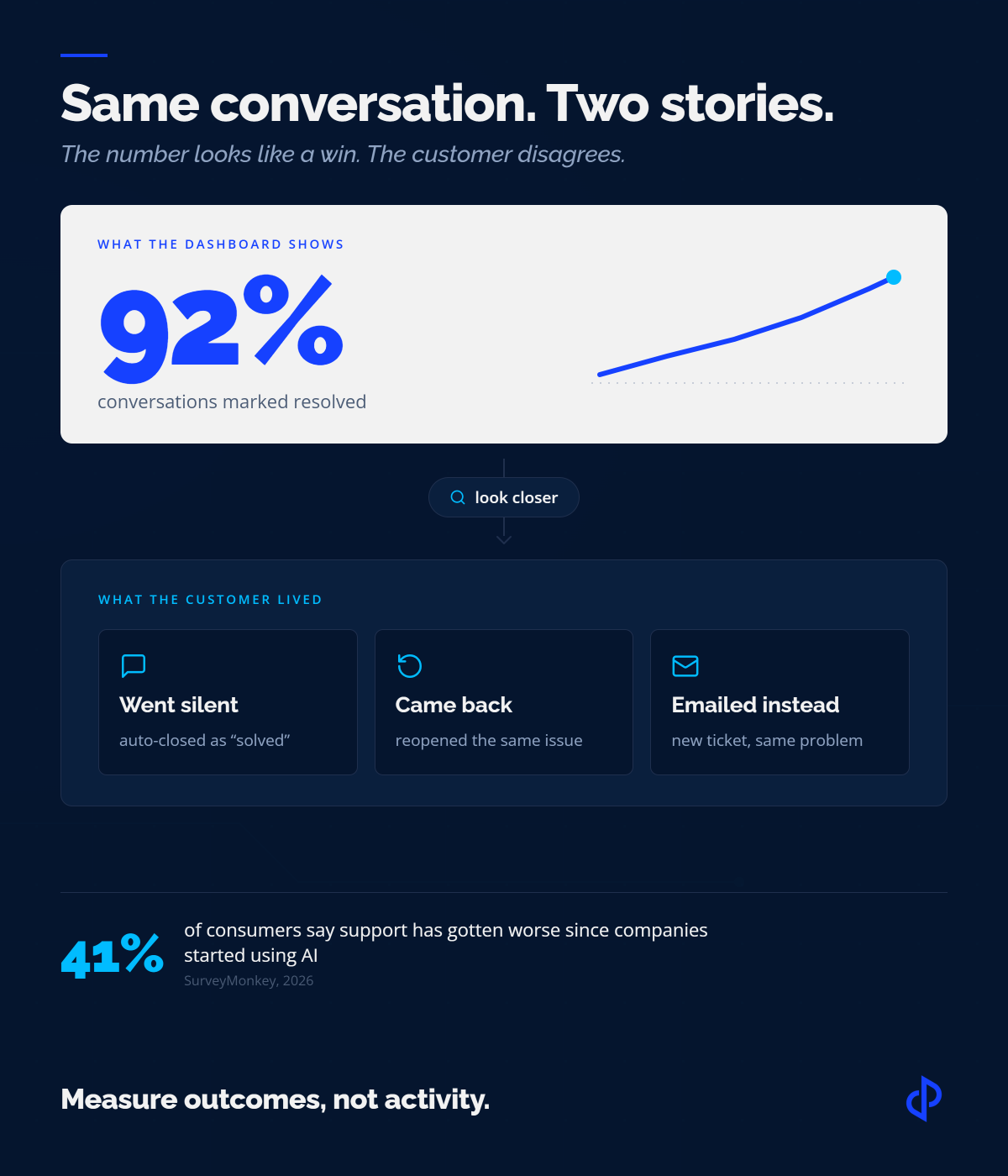
The numbers usually aren't wrong, exactly. A 92% resolution rate probably is 92% of something. It's just rarely 92% of "customers who left happy and never had to ask again." That's the gap this whole article is about, and once you see it, you can't unsee it.
The Misconception That Costs Teams the Most
There is a trap that catches good teams, and it has nothing to do with picking the wrong vendor. It's assuming that deploying the AI was the hard part. It isn't anymore.
Roughly 80% of companies are now using or planning to adopt AI powered customer service, so the buy decision is close to settled industry wide.
The teams pulling ahead aren't the ones who adopted first. They are the ones who can tell you, honestly, whether the thing they adopted actually works. That is a much harder question, and far fewer teams can answer it.
Here is the misconception underneath most of it: the belief that you can measure AI customer service success with the same numbers the vendor prints on the dashboard.
Those numbers were built to show off the product. They weren't built to show you the customer's experience. That's not a conspiracy, it's just a design choice, and every buyer inherits it without really noticing.
So, you get a familiar scene. The dashboard shows a 92% resolution rate. Leadership is happy.
of consumers say support got worse since companies started using AI. Meanwhile, 64% say they would rather work with business that doesn't use AI for support at all, mostly because it gets so hard to reach a human.
Both things are true at once. The dashboard is green. The customer is annoyed. The reporting just never connected the two.
Good AI reporting measures what happened to the customer, not what the AI chatbot did.
First Question: Which AI Are You Actually Measuring?
Before we touch a single metric, we have to settle something a lot of articles skip. "AI customer service" isn't one thing, and the two main flavors need completely different scorecards.
The first is the customer-facing AI chatbot: conversational AI for customer service that talks to your customer directly, resolves or escalates, and shows up on the dashboard as resolution and containment. That's what most of this guide covers, because it's where the misleading numbers live.
The second is agent-assist, sometimes called a copilot. The customer talks to a human; the AI drafts replies, summarizes the thread, suggests next steps, and pulls up relevant docs behind the scenes.
A growing share of AI customer support runs this way, and if you measure it with bot metrics you'll learn nothing. Resolution rate and containment don't even apply. What matters instead is adoption (are agents using it or ignoring it), edit or override rate (how much they rewrite what it suggests), time saved per ticket, and whether quality holds or slips when they lean on it.
A copilot with a 90% override rate isn't helping. It's a very expensive autocomplete your team is politely working around.
Plenty of teams run both at once, which is fine. The mistake is running a copilot and grading it on a bot's report card, or vice versa. Decide which one you're measuring before you decide what "good" looks like.
Why Dashboards Confuse Activity with Success
A support dashboard is really an activity log wearing an outcome report's clothes. It counts what it can see: messages sent, sessions closed, buttons clicked, chats that ended without a human stepping in. What it can't see is everything that happens off-screen, and off-screen is usually where the truth lives.
The first thing most operations teams notice when they audit their own reporting is how much of the "success" is just the absence of a recorded failure. A conversation that ends gets counted as resolved.
A conversation the customer walks away from? Also resolved, because storming off and leaving satisfied look identical to a system that only watches the session. The dashboard isn't lying. It's answering a much narrower question than the one leadership is asking.
Try this sort. For any number on your dashboard, ask one thing: does this describe something the AI did, or something the customer got? Almost every misleading metric lands in the first pile. Almost every trustworthy one lands in the second. It's a crude test, and it works better than it has any right to.
The Six Metrics That Mislead Most
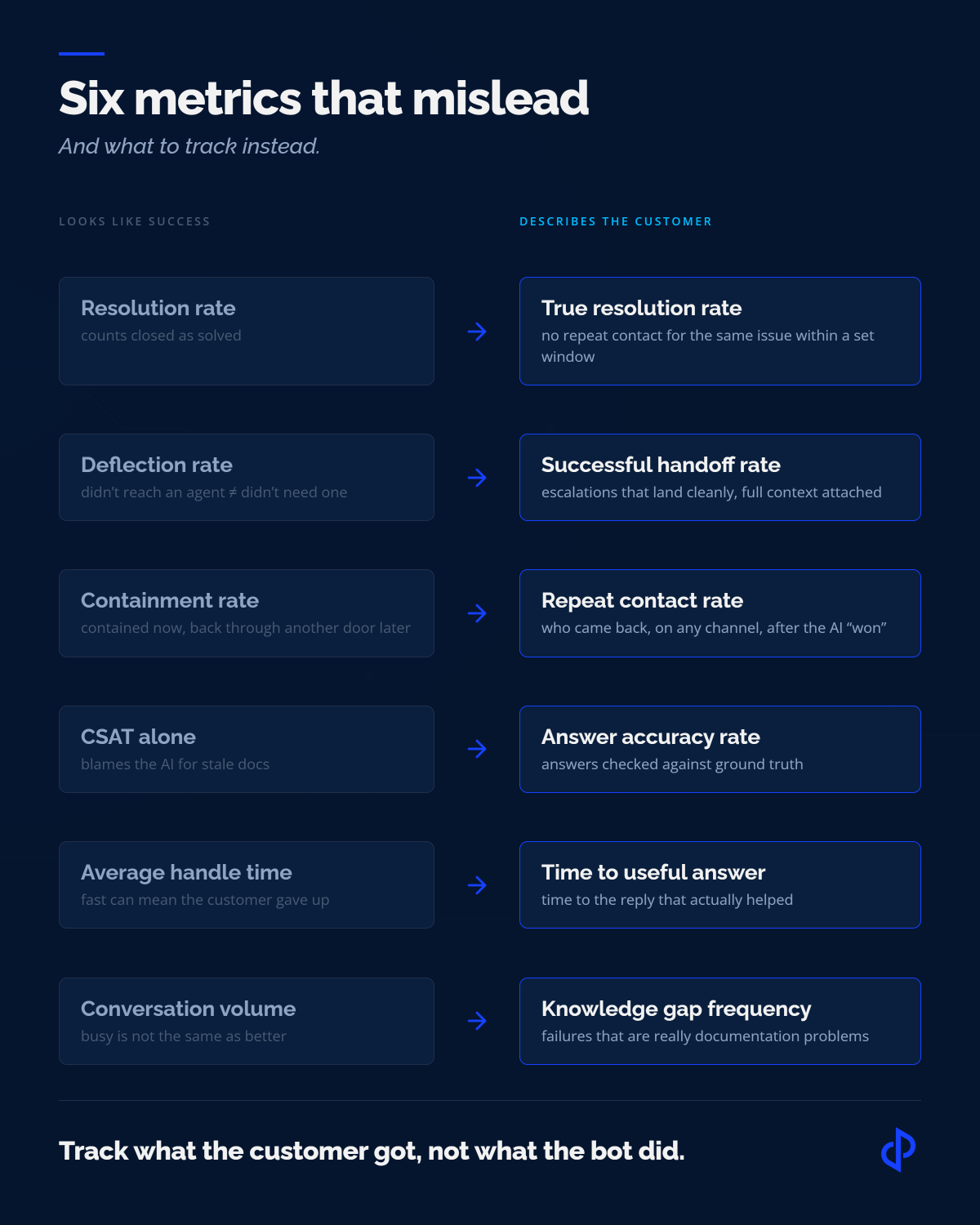
None of these are useless. Each one only turns dangerous when you treat it as proof of success instead of a place to start digging.
Resolution Rate
Assumes closed and solved are the same. A customer who gave up looks identical to one who got a real answer. Silent auto-closes inflate the number without anyone noticing.
Deflection Rate
Only tells you the customer didn't reach an agent, not whether they needed one or got what they came for. High deflection can mean good AI, or a broken escalation path.
Containment Rate
Describes what happened to the conversation, not the customer. Watch for high containment sitting next to a rising repeat-contact rate. The chat was held; the issue wasn't.
CSAT (alone)
Often punishes the AI for stale docs. A perfectly accurate answer built on bad content still earns a one-star rating for a process failure the AI never could have prevented.
Average Handle Time
In AI, fast can mean the customer bailed. Speed without resolution is abandonment with a good stopwatch, not efficiency.
Conversation Volume
Rising volume gets sold as adoption. It can also mean your product or docs are confusing more people. Volume tells you how busy the system is, not whether it should be.
The Blind Spots Your Dashboard Can't See
Underneath those six metrics sits a whole layer of customer behavior that standard AI reporting barely captures. Experienced teams learn to hunt for these directly, because no summary number is going to surface them for you.
Silent auto-closes
Conversations timed out and stamped "resolved." They inflate resolution and containment at the same time.
Confidently wrong answers
Fluent, plausible, completely incorrect. No error flag, CSAT can even be positive in the moment. The damage shows up later.
Abandoned conversations
Customers who just stop replying mid-thread. The system reads the silence as satisfaction.
Silent self-service failures
People who bounce off the help center or bot and never open a ticket. They never appear in any metric, yet they left unhappy.
Repeat tickets right after a "win"
Same customer, same issue, new channel, within a day. That AI chat was a detour, not a fix.
Escalating too late or too early
The AI swings past the point of usefulness, or punts issues it could have handled. Both quietly eat the efficiency you bought it for.
Every one of those can sit comfortably behind a green dashboard. That's the whole problem, right there.
The Metrics That Actually Matter
The goal isn't more metrics. It's the right ones. Every measure below has one thing in common: it describes a customer outcome or a root cause, not a bit of bot activity. And because a metric you never act on is just decoration, each one comes with the decision it should drive.
"So, What's A Good Resolution Rate?" Wrong Question.
This is the question everyone asks, and it's the wrong one, so let's deal with it head on.
You'll find articles claiming the benchmark is 60%, or 70%, or 80%. Ignore them. A resolution rate is meaningless without knowing which intents the bot handles, how you count a resolution, and how complex your product is.
An AI chatbot that only answers "where's my order" will post gaudy numbers. A bot handling nuanced billing questions for a legal platform will post lower ones and be far more valuable. Comparing them is like comparing a sprinter's time to a marathoner's.
Here's what to do instead. Set your own baseline in the first few weeks, then measure yourself against your own trend, not somebody else's blog post. Is true resolution rate climbing week over week? Is reopen rate falling? Is accuracy holding as you expand what the AI covers? Those directional answers tell you more than any industry benchmark ever will.
If you want an external comparison that actually means something, compare the AI against the human baseline it replaced. What was your reopen rate, your CSAT, your time to useful answer when humans handled these same intents? That's the only apples-to-apples benchmark you own, and it's the one leadership should care about anyway. The question isn't "is our AI good in the abstract." It's "is our AI better than what it replaced, on the work it actually does."
How To Actually Wire This Up
Fair objection at this point: this all sounds great, but the good metrics don't come out of the box. True. Here's the practical version. It's more achievable than it looks, as long as you're honest about where it gets messy.
Match Across Channels, Accept an Imperfect Match
True resolution rate and repeat contact rate both hang on one join: linking an AI chat to any follow-up ticket, email, or call from the same person, then asking whether they came back about the same thing inside a set window (72 hours is a reasonable default).
The catch every ops leader already knows is that identity is slippery. People chat anonymously, then email from a personal address, then call from a number nobody logged. You will not get a clean match, and you don't need one. Join on whatever you have, account ID when they're logged in, email otherwise, plus a fuzzy pass on name and issue type, and read the result as a floor rather than a full count. Even a partial match exposes the pattern, and the pattern is the point.
Sample Two Ways
For recurring themes, a structured random sample of 30 to 50 "resolved" chats a week is plenty. It surfaces the documentation gap or the escalation misfire long before it would ever move an average. But random sampling is close to useless for catching rare, expensive failures like confidently wrong answers.
If a dangerous answer shows up 2% of the time, 50 random chats catch about one, and you'll miss it more weeks than you find it. So sample those on purpose. Pull the highest-risk intents (billing, security, legal, anything irreversible) and review them deliberately, or auto-flag them for a human to check. Random sampling measures the average experience. Targeted sampling protects you from the tail, and the tail is what ends up in front of your legal team.
Score It With A Short, Boring Rubric
For each sampled chat, the reviewer answers a handful of yes/no questions. Did the customer's actual problem get solved? Was the answer factually correct? Did it escalate at the right moment? Was the customer visibly frustrated? That's it.
Four honest yes/no columns scored the same way by everyone beat an elaborate rubric nobody applies consistently. Consistency is the whole game: a crude-but-repeatable score trends reliably, a sophisticated-but-subjective one just adds noise.
None of this needs a data team. It needs one clean export, a recurring hold on the calendar, and a named owner. Do it for a few weeks and you'll have real accuracy and true-resolution numbers built from your own data, which beats any benchmark you could borrow.
How To Actually Train an AI Chatbot For Support
Let's kill a myth first, because it sends teams down the wrong path. When people hear "train the AI chatbot," they picture data scientists fine-tuning a model. For almost every support team, that's not what training means, and it's not where your time should go.
Your vendor owns the model. You own everything that decides whether the model gives your customer the right answer: the knowledge it can reach, the intents it recognizes, the guardrails on what it's allowed to say, and the loop that corrects it when it's wrong.
That is the training that moves your numbers, and here's how experienced teams do it.
Start From Real Tickets, Not Imagined Ones
The fastest way to build a useless bot is to sit in a room guessing what customers will ask. Instead, pull six to twelve months of real tickets and chat logs, cluster them by intent, and rank by volume. Now you've got twenty or thirty things people ask, in their actual words. That's your training scope. And the "actual words" part matters, because customers don't type "how do I reset my authentication credentials," they type "can't log in help."
Ground It In Documentation You've Personally Checked
The bot answers from your knowledge base, so a chatbot training project is really a documentation project wearing a disguise. Before you connect anything, read the articles behind your top intents and confirm they're current, correct, and specific enough to actually answer the question. An accurate bot sitting on stale docs produces confident, wrong answers. Fixing the docs is training. It's arguably most of the training.
Teach It When To Give Up
This is the step teams skip, and it's the one customers feel the hardest. For each intent, decide what the bot does when it isn't confident: hand off to a human, ask one clarifying question, or just say plainly that it doesn't know and route the person somewhere useful. An AI chatbot that confidently guesses is far worse than one that escalates gracefully. Your fallback behavior isn't a setting you flip at the end; it's a core part of what you're training.
Test Against History Before You Test on Customers
You already own the perfect test set: real past conversations where you know how they should have ended. Before launch, run a batch of them through the bot and grade the answers against what resolved each case.
You catch the embarrassing misses in a conference room instead of in front of a paying customer, and you get your first accuracy baseline for free.
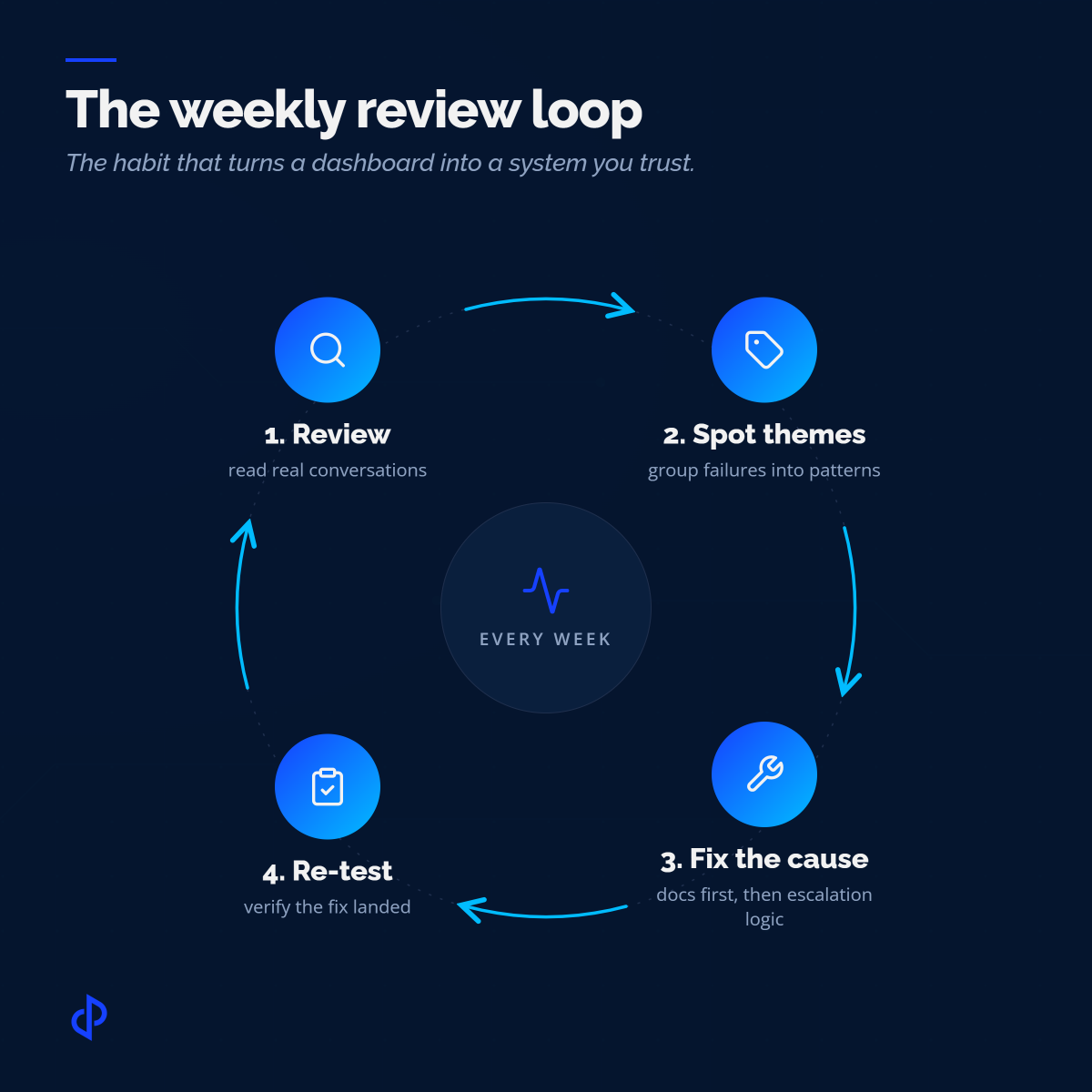
Then the part almost everyone underestimates: training never ends. The weekly review loop is your training pipeline, whether you call it that or not. Every failure theme you surface is really a training instruction: a doc to rewrite, an intent to add, a fallback to loosen or tighten, a guardrail to adjust.
Teams that treat launch as the finish line watch their bot quietly rot as the product changes underneath it. Teams that treat launch as day one of training watch it get measurably better every month. That gap has nothing to do with the model and everything to do with whether someone owns the loop.
What A Strong Weekly Rhythm Looks Like
Here's the thing the teams getting real mileage out of conversational AI for customer service have in common, and it has nothing to do with which tool they bought. They read their conversations on a schedule, and they change something because of what they read. That's it. That's the trick.
I know what you're thinking: who has time to read hundreds of conversations every week? Nobody does, and nobody should. This is the sampling from a minute ago, and it's a couple of focused hours, not a full-time job. The teams that skip it don't save time. They just pay for it later, in churn they can't explain.
A typical week kicks off with the ops team pulling the chats the dashboard called successes and sampling them by hand. Silent auto-closes first, because that's where inflated resolution likes to hide. They compare reopen rates against last week and flag anything trending the wrong way. Then they group the failures into themes instead of chasing each one solo, because a theme points to a cause, and a cause points to a fix.
Midweek, the work shifts from finding to fixing. The recurring documentation gaps from Monday get written up and corrected, since most "AI failures" are really content failures, and documentation is the one lever an ops team fully controls.
The harder fixes, retuning escalation logic or changing how the bot handles an intent, often sit with engineering or the vendor, so the review's real output is a prioritized list with evidence attached, not an instant patch. Good teams work it that way on purpose: fix the docs now, queue the config changes with the transcripts that justify them, and rerun QA once each change lands so the improvement is verified instead of assumed.
None of this is glamorous. It's also the entire difference between AI that gets better every week and AI that peaked on day one.
The payoff lands in the monthly executive review, and it quietly changes the questions leadership asks. The old meeting opened with "what's our deflection rate?" The new one opens with "how many customers actually finished what they came to do, and where did we let them down?" That second question is harder to answer and impossible to fake, which is exactly why it's the better one. Make that shift and the reporting stops being a scoreboard and starts being a map.
How To Start with AI Powered Customer Service: Crawl, Walk, Run
Most teams' real anxiety isn't overspending. It's not knowing where to begin, and not knowing how they'll tell whether it worked. So instead of a launch checklist, think in stages. You don't need all of this on day one. You need the next stage.
Crawl
Before you evaluate a single tool, write down your top customer intents by volume and the answers behind each one. AI lives downstream of documentation, and the best conversational AI on earth still can't retrieve what doesn't exist. Fix the thin and stale answers first, then launch narrow on a handful of high-volume, low-risk intents, and set your baseline.
Walk
Instrument the outcome metrics. Wire up the cross-channel match so you can see when a "resolved" chat becomes an email ticket. Stand up the weekly sampling review with an owner and a rubric. And treat the escalation path as a first-class feature, not an afterthought. A clean, well-timed handoff isn't a failure of AI, it's one of its most important wins.
Run
With a rhythm in place, you expand the AI into harder intents on evidence rather than hope, watching accuracy and true resolution as you go. This is also where AI governance stops being a policy document and becomes a habit, because a real person is looking at what the automation does to real customers every single week.
The stat that sums up the whole journey: only about 25% of contact centers using AI have fully folded it into daily operations, even though most use it in some form. That distance between "we have AI" and "our AI works" is exactly that integration, and you get there by walking through the stages, not by buying your way past them.
How DemandPulse helps teams grow support with AI
Measuring honestly is step one. Building the operation that actually acts on what you measure is step two, and that's the part most teams don't have the bandwidth to own. It's where DemandPulse comes in.
The philosophy DemandPulse follows is "AI-empowered, not AI-replaced": let AI handle the repetitive work so skilled agents can spend their time on the messy problems and relationships that keep customers around.
In practice, the disciplines this article argues for become the standing operating model instead of a project someone squeezes in between fires. Conversation reviews and support QA run on a schedule, with playbooks, rubrics, and certifications that keep the scoring consistent as the team grows.
Escalation paths and support tiers get designed around your real ticket volume and complexity, which is the biggest single lever on escalation quality and clean human handoff. And a US-based strategist owns the weekly loop alongside a structured global team, turning failure themes into documentation fixes, escalation changes, and re-tested improvements.
Across its support engagements, DemandPulse has delivered 82% faster first-response times, a 59% first-contact resolution rate, a 60% cut in resolution times, and a 40% reduction in support costs, all while holding customer satisfaction above 90%. Those are outcome numbers, and they come from the kind of operational discipline a dashboard alone will never hand you.
The one idea worth keeping
Measuring honestly is step one. Fixing the gaps is step two. DemandPulse builds the reporting rhythm and the human coverage that turns an AI dashboard into something you can trust.
Subscribe for Insights That Drive Growth
Practical tips to help you grow your business and build a great team, sent to your inbox.